

Case Study
Marketo Editors
Product Designer 3 (Lead)
2021 - 2022
The Challenge:
When Adobe acquired Marketo, it inherited a product with deeply entrenched workflows and editors that hadn't kept pace with modern UX standards. Marketo's email, form, and landing page editors were functional, but clunky and dated. They didn't align with Adobe's design system, and they created friction for the power users who lived inside them every day.
The goal was to modernize all three editors not by building from scratch, but by finding the right Adobe-native editor foundations and adapting them to Marketo's specific needs.


My Role:
I led Marketo's side of design for this initiative, working across multiple Adobe product teams to source existing editor components. Also, I worked with the research team to conduct user testing with Marketo's power users, built full-scale prototypes in XD, and drove alignment between Marketo and the Adobe teams whose technology we were adopting.
The Constraint That Changed Everything
We weren't starting with a blank canvas. Adobe already had editors in production that were built, tested, and maintained by other teams. The challenge wasn't inventing something new; it was navigating a complex internal ecosystem to find the right foundation, then proving that it would actually work for Marketo's users.
This meant doing real cross-functional work: relationship building, technical scoping, user validation, and design translation all at once.

The Process:
Step 1: Editor Landscape Across Adobe
I reached out to multiple product teams across Adobe to map what editors already existed, how they were structured, and which might be a fit. This surfaced two strong candidates. One used in Adobe Journey Optimizer (AJO) and another from the Adobe Experience Manager (AEM) with a more flexible content structure that aligned with Marketo's email templating model.


Step 2: User Testing and Internal/Competitor Research
Rather than assume which editor would work best, we brought our Adobe-based options to Marketo's heaviest editor users. What we heard shaped the direction: users needed robust template management, inline image editing, version history, and a cleaner content structure panel.
We also audited all Marketo editors, their features, and functions, and we did research and analysis of competitors in the editor space.


Step 3: Adapting the Foundation
Working closely with the Adobe editor teams, I designed Marketo-specific adaptations with component modifications, new interaction patterns, and UI adjustments to bring the editors in line with Marketo's workflows while staying within Adobe's Spectrum design system. This required constant negotiation between what was technically feasible and what users actually needed.


Step 4: Full-Fidelity Prototyping and Validation
I built complete end-to-end prototypes in XD for all three editors (email, landing page, and form) and ran a second round of user testing to validate the adapted designs before dev handoff.
Email Editor

Full editor flow.

Template selection.

Image editor.
Full editor flow.
Landing Page Editor

Full landing page editor flow.

Template selection.
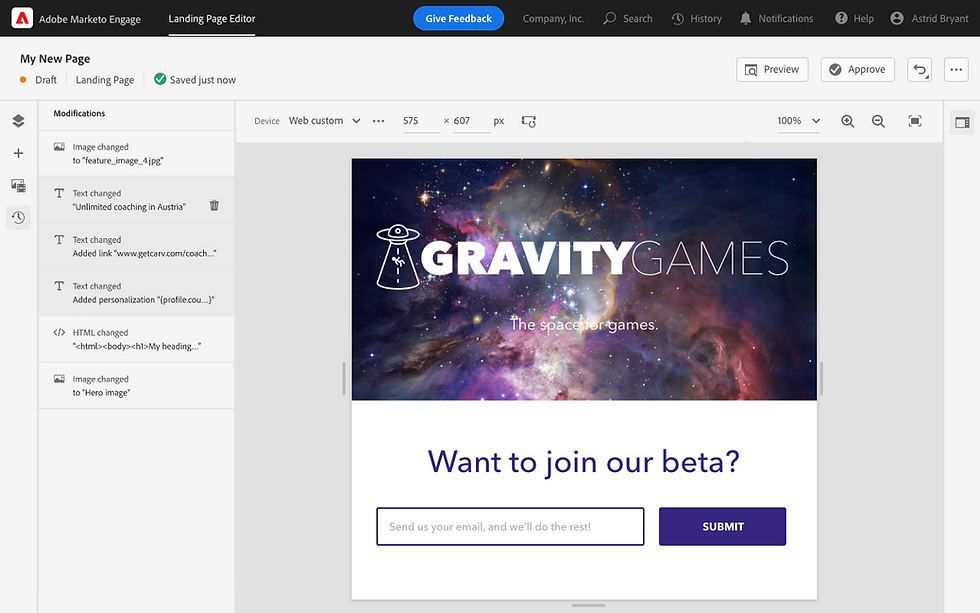
Editor history.
Full landing page editor flow.
Form Editor

Form editor full flow.

Template selection.

Editor history.
Form editor full flow.
The Outcome:
The editors were fully implemented after I transitioned out of Adobe. Early user testing results, however, were strongly positive. Users responded well to the improved structure, cleaner interface, and alignment with the Adobe ecosystem they were increasingly working within.
This project was one of the most complex cross-functional design challenges of my career. No single team owned the full problem, stakeholders spanned multiple product orgs, and the constraints were real. Navigating all of that while keeping user needs at the center is what I'm most proud of.